You can use Google Gemini to create AI-generated Eid photos by providing detailed text prompts. Ensure you are logged into your Google account and start a new chat to input your desired image description.
Explorer
Eid Ul-Fitr 2026 Is Here, And These 5 Google Gemini Prompts Are Worth A Shot
Eid Ul-Fitr 2026 is here, and Google Gemini is letting people create free, studio-quality festive photos using just a text prompt. No design skills needed.

Eid ul-Fitr 2026: Google Gemini now lets you create high-quality, festive images using simple text prompts.
Source : ABPLIVE AI
- Google Gemini now allows creating AI-generated Eid Ul-Fitr photos.
- Users can generate festive images using text prompts, no design skills needed.
- Specific prompts are provided for realistic portraits of individuals and couples.
Eid ul-Fitr 2026 is around the corner, and if you are looking to post something special on Instagram this year, AI-generated photos might be worth trying. Google Gemini now lets you create high-quality, festive images using simple text prompts. You do not need any design skills or paid tools to get started.
Just a Google account and the right prompt are enough to generate images that look like they came straight out of a professional photoshoot.
Try These Eid Ul-Fitr 2026 Gemini Prompts
Here are some ready-to-use prompts you can copy and paste directly into Google Gemini to create your Eid photos:
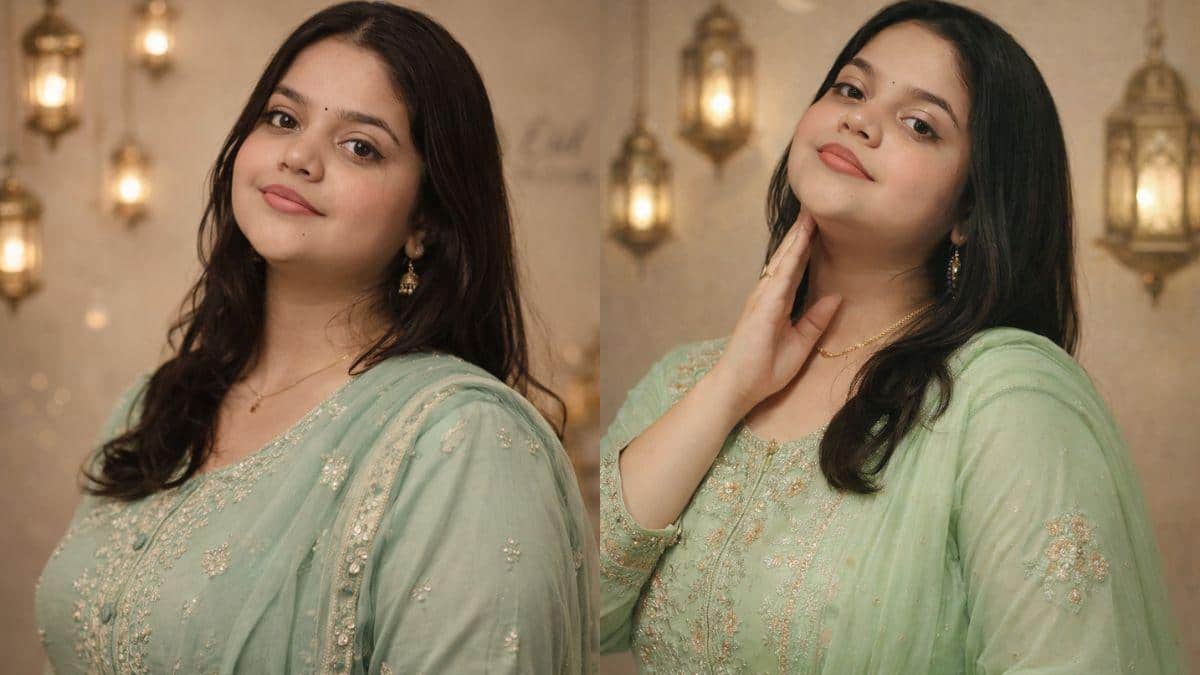
Prompt 1: Ultra-realistic Eid portrait using my uploaded face with 100% identity lock: no changes to facial features or skin texture. 3:4 vertical, DSLR 85mm. Woman in a mint green embroidered salwar suit with a chiffon dupatta. Minimal jewelry. Soft indoor lighting, beige Eid-themed background with lanterns, shallow depth of field, elegant editorial style, ultra-sharp focus.
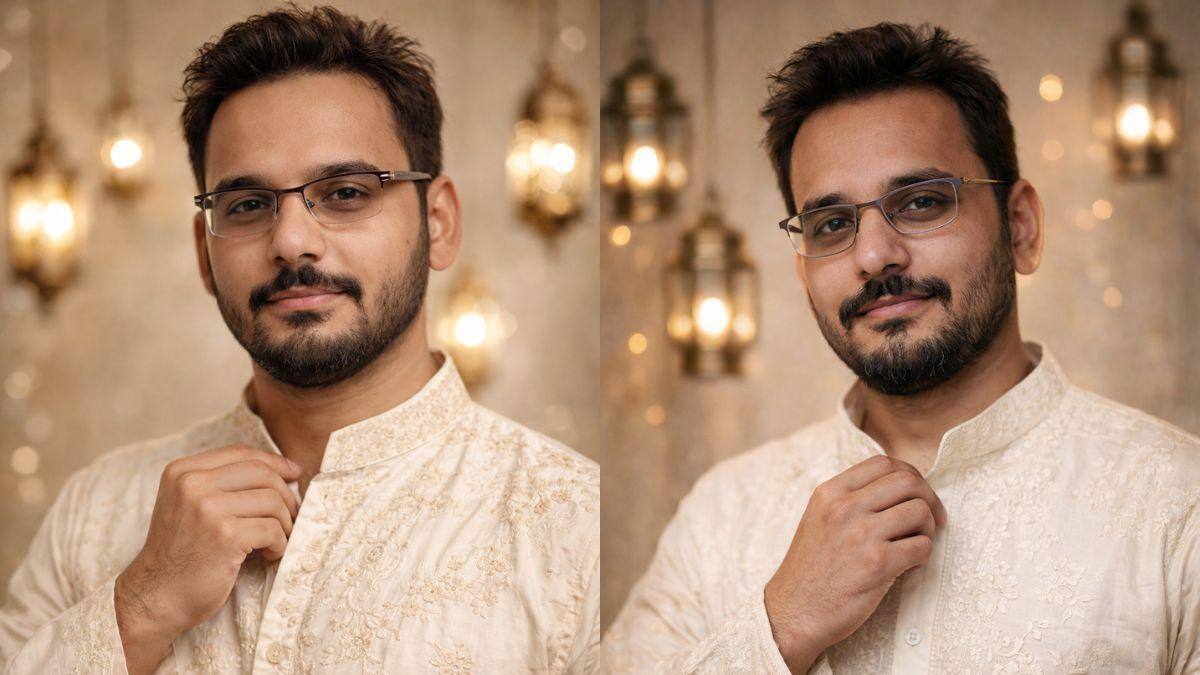
Prompt 2: Ultra-realistic 3:4 Eid portrait using my uploaded face with 100% identity lock: no changes to facial features or skin texture. Young man in an ivory embroidered kurta, adjusting the collar, with a calm, confident look. Soft indoor lighting, beige festive background with lanterns. DSLR 85mm, shallow depth, ultra-sharp face, natural skin, cinematic editorial style.

Prompt 3: A high-resolution, cinematic portrait of a beautiful woman celebrating Eid, wearing a vibrant fuchsia pink silk sharara suit with intricate gold zari embroidery. She is wearing oversized, ornate gold Chandbali earrings that catch the light. Her hands are adorned with a stack of matching pink and gold glass bangles. Soft, warm festive lighting with a blurred background of Eid decorations. 8k resolution, elegant pose, shallow depth of field.

Prompt 4: Ultra-realistic 3:4 luxury Eid editorial portrait of a Muslim couple in a studio. Use uploaded faces exactly, no modification, preserve identity and natural skin texture. Woman in lavender lehenga, man in kurta pyjama. Elegant pose, minimal accessories. Cream backdrop with Eid decor. Cinematic lighting, 85mm lens, ultra-sharp faces, shallow depth, great detail.

Prompt 5: Hyper-realistic Ramadan Iftar scene in a mosque courtyard at Maghrib. Woman seated on a prayer mat, hands raised in dua, with a serene expression. Light grey sharara. Iftar spread with fruits, dates, juice, and snacks. Warm golden lights, lanterns, marble reflections, twilight sky. Waist-up, 50mm, eye-level, ultra-HD, natural skin, realistic lighting.
How To Create Eid Ul-Fitr AI Photos Using Google Gemini
Using Google Gemini to generate Eid photos is straightforward. Here is a simple step-by-step guide to get you started:
Step 1: Open Google Gemini in your web browser and make sure you are logged in with your Google account.
Step 2: Click on "New Chat" on the homepage to begin a fresh conversation.
Step 3: Type or paste your prompt into the chat. A good prompt should be clear, detailed, and descriptive. The more specific you are about what you want, the better the output will be.
Step 4: Press Enter, and Gemini will generate a set of images based on your prompt. If the results are not what you expected, you can either refine your prompt or ask Gemini to regenerate the images.
Pick a prompt, open Gemini, and see what your Eid photos could look like with a little help from AI this year.
Frequently Asked Questions
How can I create AI-generated photos for Eid Ul-Fitr 2026?
What is needed to start generating AI images with Google Gemini?
You only need a Google account and a well-crafted text prompt to begin creating images. No special design skills or paid tools are required.
Can I use my own face in the AI-generated Eid photos?
Yes, some prompts specifically mention using your uploaded face with an 'identity lock' to ensure your facial features are preserved without changes.

Top Headlines
Technology
Samsung Galaxy Watch 9 Vs Samsung Galaxy Watch Ultra 2: The Chic & The Chunky
Technology

Google Pixel 11 Pro XL First Review: Google's Most Complete Pixel Yet
Technology

11.1% Drop In Smartphone Shipments, Record Prices: Why Waiting For Diwali Could Backfire
Technology

Asus Zenbook S14 Review: Thin Enough To Disappear, Powerful Enough To Be Noticed










See Today's Weather 
powered by