How To Turn Off Liquid Glass On iOS 26: Quick Guide For iPhone Users
If you hate the transparent, wobbly Liquid Glass effect in iOS 26, you can quickly make your menus less transparent and your device faster with these simple accessibility settings.

- Increase contrast for improved readability and sharper outlines.
- Reduce motion to simplify animations and boost performance.
- Restore Safari's familiar toolbar for easier browsing.
How To Turn Off Liquid Glass: iOS 26 was the big thing for Apple, but for Apple users, um, probably not! If you count yourself in the “don’t like the new software update” club, you’re not alone. The new Liquid Glass interface is all a bit too see-through. It may look avant-garde, but some people find it confusing, slow, or just plain ugly. The good news? You can tweak a few settings to make your iPhone, iPad, or Mac look less transparent, work faster, and stop that dizzying see-through effect.
Even older devices can feel almost new again with these simple tweaks, making your daily use smoother and easier.
Before we get into the thick of things, you should note that you can't actually turn the Liquid Glass theme off, but what you can do is reduce the transparency of the overall UI.
Reduce Transparency
Follow these simple steps:
On an iPhone or iPad, open Settings > Accessibility > Display & Text Size and toggle Reduce Transparency on. For even better visibility, you can also toggle the Increase Contrast option on. 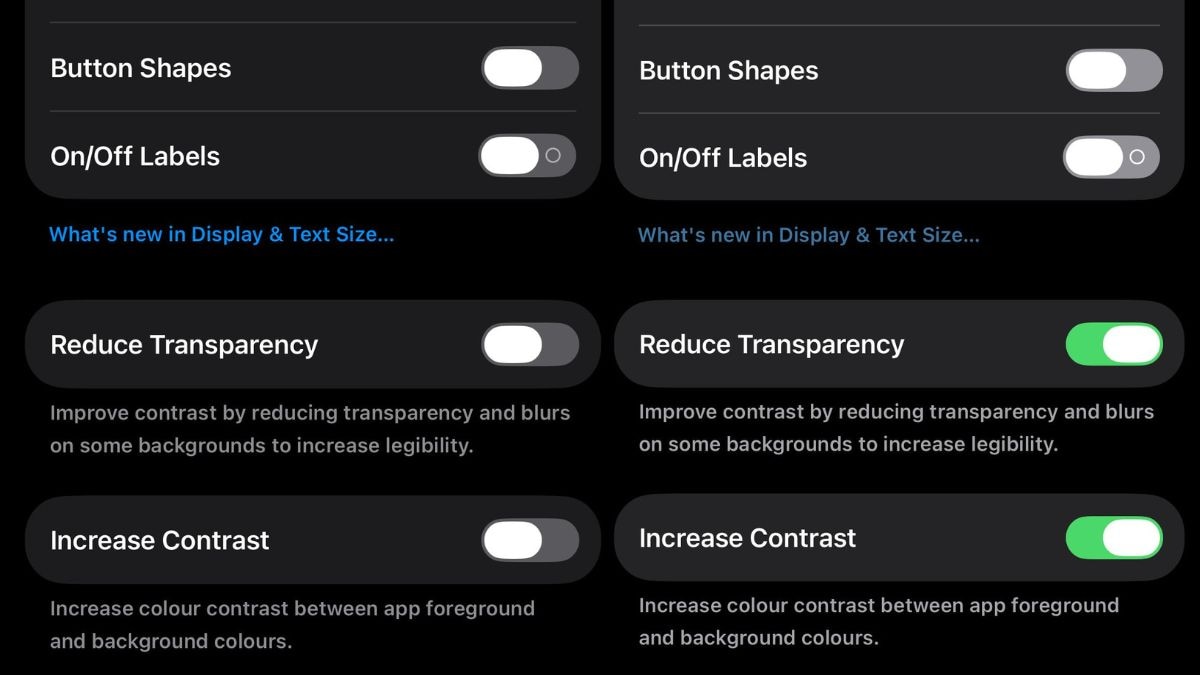
On a Mac, go to System Settings > Accessibility > Display and turn on Reduce Transparency.
Once you do these, menus, tabs, and buttons will appear much less transparent, effectively disabling the Liquid Glass theme.
Reduce Motion
Too many bouncing animations slowing things down? Go to Accessibility > Motion and turn on Reduce Motion. Animations become simpler, menus pop faster, and your device feels snappier.
Bring Back Old Safari Toolbar
iOS 26 made Safari’s toolbar smaller. To get the old look, go to Settings > Safari > Tab Style and pick Bottom or Top. Now tabs are back where you like them, making browsing less frustrating.
These tweaks won’t completely remove Liquid Glass, but they tone down the worst parts. Your device will feel cleaner, faster, easier to use, way less wobbly, and your eyes will thank you for the reduced blur.


Top Headlines