Jungle Bricks On Games Live: How To Break Bricks, Collect Fruits, Win Big In This Adventure Game
Breaking bricks and collecting fruits is fun with Jungle Bricks on Games Live. Learn everything about this adventure game here and start playing now.
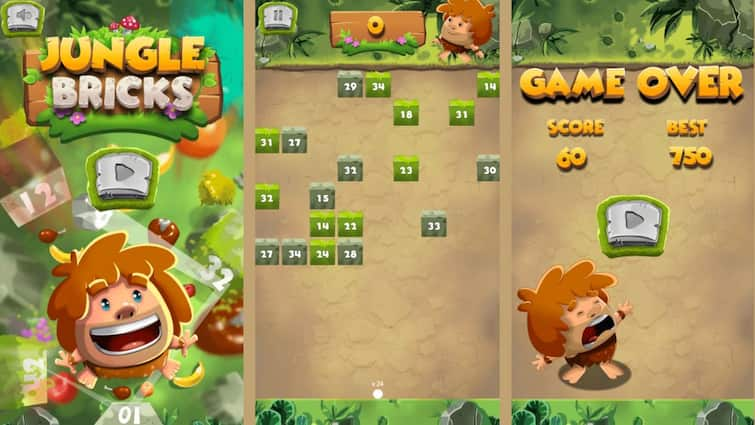
Jungle Bricks on Games Live: Online gaming has evolved significantly, introducing new games daily. Whether on smartphones or desktops, players have a wide range of games to choose from, including sports, casual, and puzzle games. However, adventure games stand out with their thrilling gameplay and captivating graphics. For those eager to explore such experiences, Games Live presents a selection of adventure games. Jungle Bricks stands out among the myriad of adventure games available. It's free on Games Live, and playable across all devices without any download hassles.
ALSO READ: Captain Gold On Games Live: Collect Gems And Win Gold - How To Play This Adventure Game For Free
What Is The Objective Of Jungle Bricks?
Get on an adventure with the brave jungle boy in Jungle Bricks, where the excitement of collecting apples, grapes, and cherries awaits. Developed by Freak X Games and accessible on Games Live, this game guarantees thrilling gameplay that will immerse you in aiming, shooting, and smashing through bricks to score big.
ALSO READ: Cards 21 On Games Live: Play This Fun Cards Game On Games Live For Free; Here’s How To Get Started
Jungle Bricks On Games Live: How To Get Started
Games Live is your ultimate gaming hub where you can play Jungle Bricks for free. With over 160 free games across various genres, you can enjoy them on smartphones or desktops without any downloads. Follow these steps to start playing Jungle Bricks on Games Live:
1. Visit games.abplive.com.
2. Search for Jungle Bricks and launch the game.
3. Hit the Play the Game button.
4. Begin with a tutorial to learn the game mechanics.
5. Once you're ready, tap to start playing and enjoy the challenge.
ALSO READ: Sudoku X On Games Live: The Popular Puzzle Game Now Available On Your Device; Here’s How To Play It On Games Live
Jungle Bricks On Games Live: How To Play
1. Aim and Shoot:
Tap on the bricks to aim your shot and release balls to break as many bricks as possible in one go. Each ball can hit multiple bricks, so aim strategically.
2. Break All Bricks:
Continuously break bricks to prevent them from descending downward and making the stage more challenging. Clear all bricks on the screen to progress to the next stage.
3. Hit Counter:
Each brick displays a hit counter indicating how many times it must be hit to break. Keep hitting until the counter reaches zero to eliminate the brick.
4. Stay Alert:
Be vigilant! Prevent any bricks from touching the bottom of the screen to avoid losing the game.
As you progress through Jungle Bricks, the stages will pose greater challenges, offering endless entertainment and motivating you to achieve the highest scores possible.
Top Headlines