




WWDC 2022: Apple Announces Continuity Camera Feature, Will Let You Use iPhone As Mac Webcam
Apple's Continuity Camera gives Mac users the ability to use their iPhone as a webcam, and unlocks new possibilities which were never possible before on a webcam.
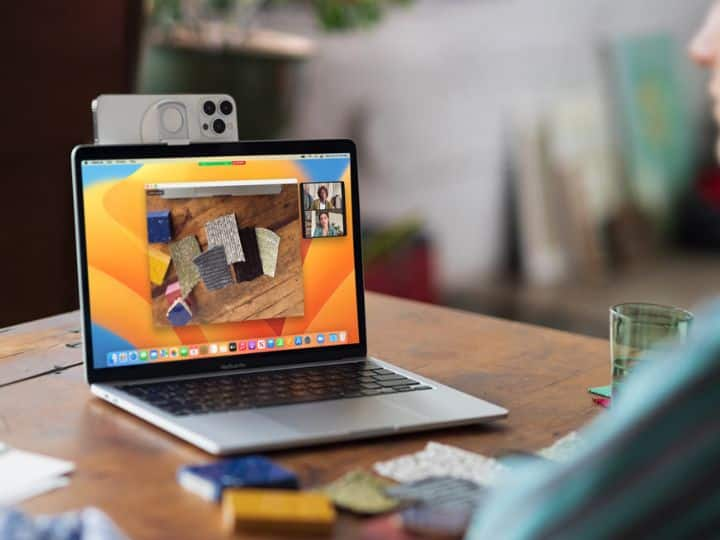
Apple kicked off its annual Worldwide Developers Conference (WWDC) at Apple Park, Cupertino, on Monday, June 6, with a first-of-its-kind special event and unveiled a wide variety of exciting innovations, including Continuity Camera, which brings new videoconferencing features to any Mac. At WWDC 2022, Apple previewed macOS Ventura, the latest version of the world's most advanced desktop operating systems that takes the Mac experience to a whole new level.
What Features Does Continuity Camera Bring?
The videoconferencing features which Continuity Camera brings to any Mac include Desk View, Studio Light, and more, Craig Federighi, Apple's senior vice president of Software Engineering, announced at the event.
Apple's Continuity Camera gives Mac users the ability to use their iPhone as a webcam, and unlocks new possibilities which were never possible before on a webcam. With the power of Continuity, Mac can automatically recognise and use the camera when it is nearby, without the need to wake or select it. Also, the iPhone can even connect to Mac wirelessly for greater flexibility.
Continuity Camera also delivers innovative features to all Mac computers including Center Stage, Portrait mode, and the new Studio Light, which is an effect that beautifully illuminates a user's face while dimming the background.
Another interesting feature of Continuity Camera is that it taps into the Ultra Wide camera on iPhone to enable Desk View, which simultaneously shows the user's face and an overhead view of their desk. This is great for Do It Yourself (DIY) videos, showing one's sketches over FaceTime, and many other activities.
Which Phones Can Avail Continuity Camera?
Continuity Camera will be available on iPhone XR and subsequent models.
In order to use Continuity Camera, a Mac will be required wirelessly, along with an iPhone or iPad with Wi-Fi and Bluetooth turned on. Also, both the Mac and the iPhone or iPad devices must be signed into the same Apple ID with two-factor authentication.
Continuity Camera with Center Stage and Desk View is available on iPhone 11 and subsequent models running iOS 16.

Top Headlines













